Restaurant Management System
All-in-one restaurant POS with table management, kitchen display, and online ordering.
Smart Dashboard & Real-Time Analytics
Get a complete overview of your restaurant performance at a glance. The dashboard displays today's revenue, total orders, active employees, pending deliveries, and monthly sales trends with interactive charts. Quick-action cards let you jump to POS, Kitchen, Tables, Deliveries, and Reports instantly. View revenue breakdown by order type (Dine-in, Takeaway, Delivery) and monitor your top-performing menu items — all updating in real-time.
Explore Dashboard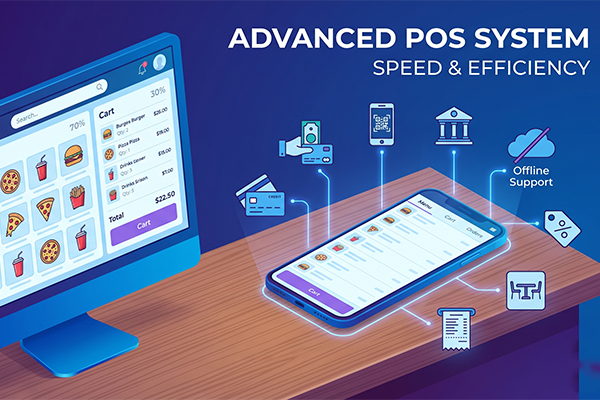
Advanced Point of Sale (POS)
A powerful POS system designed for speed and efficiency. Features a split-view layout on desktop (70% menu / 30% cart) and tabbed view on mobile. Browse menu items by category with instant search, apply modifiers and variants per item, and process orders with multiple payment methods (Cash, Card, Mobile, Bank Transfer). Apply deals and discounts automatically, select order types (Dine-in, Takeaway, Delivery), assign tables, hold and recall orders, and generate professional receipts — all with full offline support.
Discover POS Features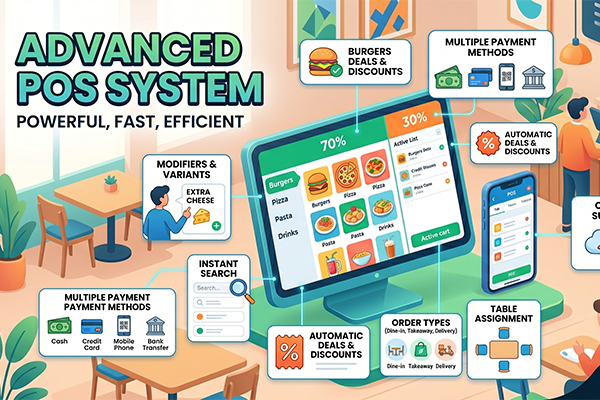
Kitchen Display System (KDS)
Streamline your kitchen operations with a real-time Kitchen Display System. Orders appear instantly on the kitchen screen as color-coded cards based on priority (Normal, Rush, VIP). Track individual item preparation with progress bars, mark items as prepared one by one, and notify front-of-house when orders are ready with audio alerts. The responsive grid layout adapts from 1 column on mobile to 4 columns on large screens, giving your kitchen staff the perfect workflow tool.
See KDS in Action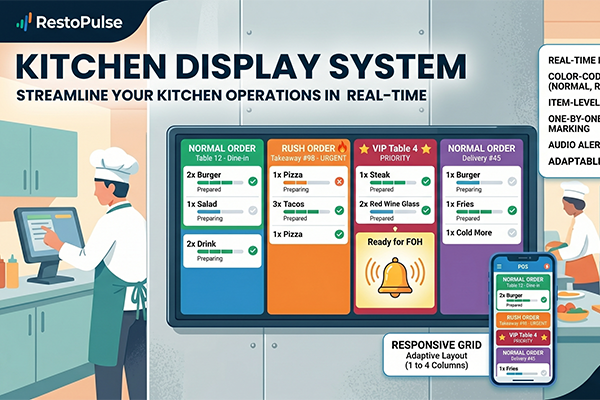
Menu Management & Deals Engine
Create and manage your complete menu with custom categories, item images, detailed descriptions, and flexible pricing. Support for both retail items and recipe-based items with automatic cost tracking. Add modifier groups (Size, Extras, Spice Level) with individual pricing. Run promotions with the built-in deals engine — configure percentage or flat discounts, set validity periods, apply to specific items, and watch deals auto-apply at checkout. Export professional PDF catalogues of your menu and deals.
Learn About Menu Tools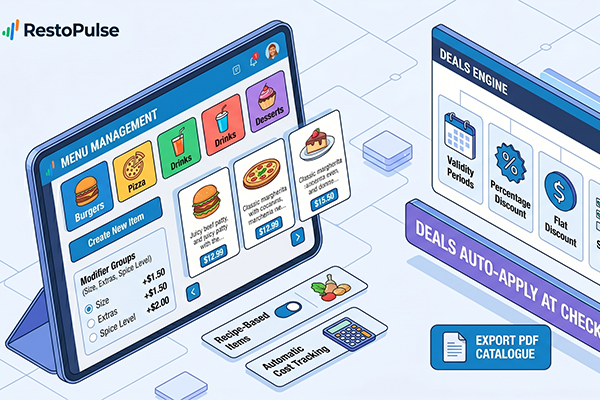
Recipe & Ingredient Management
Define recipes with precise ingredient quantities and automatic cost calculation. Link ingredients to inventory for real-time stock tracking with automatic unit conversions (kg↔g, L↔mL). When a recipe item is marked "Ready" on the KDS, ingredient stock is automatically deducted based on recipe quantities. Set up cost-per-unit tracking, monitor profit margins per dish, and receive low-stock alerts when ingredients fall below reorder points. Batch operations let you adjust multiple ingredients efficiently.
Explore Recipe Tools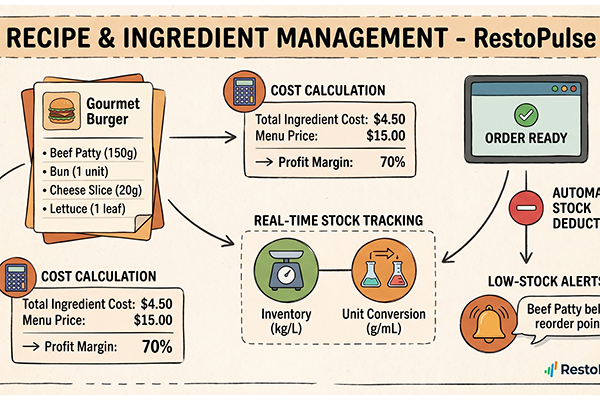
Inventory & Purchase Orders
Comprehensive inventory control with real-time stock levels, configurable reorder points, and complete transaction history. Track every stock movement — additions, deductions, adjustments, and waste — with full audit trails. Create purchase orders with a multi-step workflow (Draft → Pending → Approved → Ordered → Received) with support for partial receiving. Manage suppliers with contact details, category assignments, payment tracking, and detailed supplier ledgers showing payment history and outstanding balances.
See Inventory Features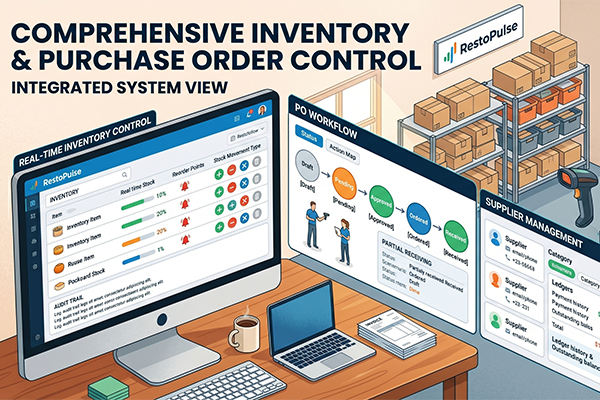
Table & Delivery Management
Visual table management with color-coded status indicators (Available/Occupied/Reserved) and real-time updates. Create tables with custom numbers, seating capacity, and location zones. Tables auto-update status when POS orders are placed and cleared when orders complete. For delivery operations, manage orders with full customer details, item tracking, rider assignment, status workflow (Pending → Confirmed → Preparing → Out for Delivery → Delivered), and delivery-specific financial tracking with tax calculations.
Explore Table & Delivery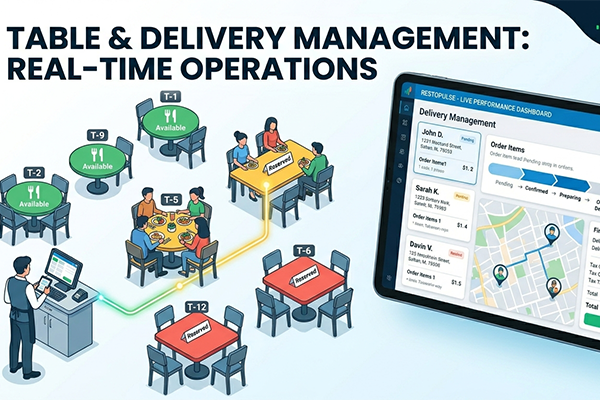
Employee & Financial Management
Complete employee lifecycle management — add staff with departments, designations, salary structures, and bank details. Track attendance with a QR code-based check-in/check-out system, manage shift schedules, and process leave requests with approval workflows. Pay salaries with detailed records per payment method. The financial dashboard provides a unified ledger of all transactions (POS sales, expenses, supplier payments, salaries) with bank account management, cash flow reports, and one-tap PDF exports for accounting.
Learn About HR & Finance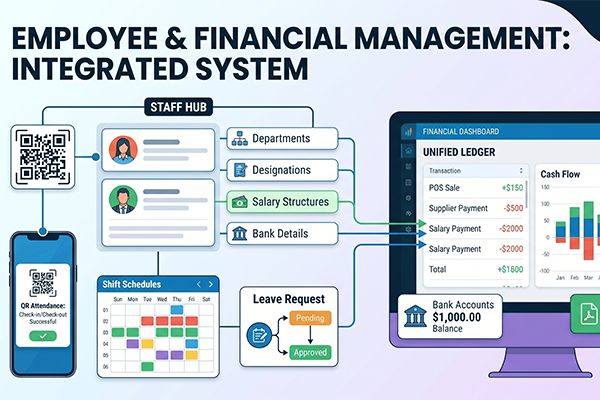
Reports, Roles & Multi-Platform Access
Generate comprehensive reports covering monthly revenue, order analytics, top dishes by quantity and revenue, payment method distribution, weekly sales breakdowns, and daily summaries — all exportable as professional PDFs. Configure granular access with custom roles and a permission matrix covering 19 modules with View/Add/Edit/Delete actions. Access your restaurant from any device — Android, iOS, Windows desktop, and web browsers — with responsive layouts optimized for each screen size and offline POS capability for uninterrupted service.
Discover Reports & More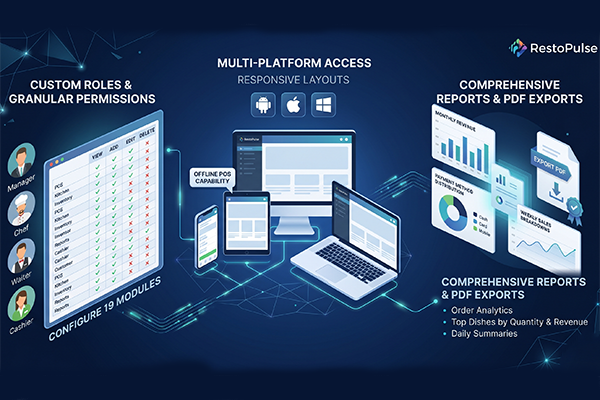
All Modules Included
Everything you need to run your restaurant — all in one powerful platform.
Why Choose This Solution?
We don't just build software — we build solutions that grow with your business.
True Multi-Platform Experience
Run your restaurant from Android, iOS, Windows, and Web — all synced in real-time through Firebase. One subscription works across all your devices with responsive layouts optimized for phones, tablets, and desktops.
Offline-Ready POS
Never lose a sale during internet outages. Our POS works fully offline, queuing transactions locally and auto-syncing to the cloud when connectivity is restored — ensuring uninterrupted business operations.
Intelligent Kitchen Operations
Real-time KDS with priority-based order display, individual item tracking, automatic stock deductions from recipes, and audio notifications keep your kitchen running at peak efficiency.
Complete Financial Control
Every transaction — from POS sales to supplier payments to salary disbursements — is automatically recorded in a unified financial ledger. Track cash flow, manage bank accounts, and export reports with a single tap.
Granular Access Control
Create custom roles with a detailed permission matrix covering 19 modules. Control who can view, add, edit, or delete data in every part of the system — from Admin and Manager down to Waiter and Kitchen Staff.
Dedicated Support & Regular Updates
Arriverr provides dedicated technical support, regular feature updates, and continuous improvements. Our team is committed to helping your restaurant succeed with a system that grows alongside your business.
Frequently Asked Questions
Got questions about Restaurant Management System? We've got answers.
The system runs natively on Android, iOS, Windows, and Web browsers. A single subscription grants access across all platforms. The interface adapts responsively — mobile uses a drawer navigation, tablets use a NavigationRail, and desktops get expanded layouts with split-view POS.
When internet connectivity is lost, the POS automatically switches to offline mode with a visual indicator. Orders can still be placed and processed normally — transactions are queued locally using SharedPreferences. When connectivity is restored, all pending transactions automatically sync to Firestore, kitchen orders are created, and the queue clears.
Yes! The system includes 6 default roles (Admin, Manager, Cashier, Waiter, Delivery, Kitchen) and supports unlimited custom roles. Each role has a granular permission matrix with View, Add, Edit, and Delete controls for 19 different modules. Staff only see sidebar items and action buttons they are authorized to use.
Define recipes with precise ingredient quantities and the system automatically calculates production cost and profit margin. When a recipe-based item is marked "Ready" on the Kitchen Display System, ingredients are automatically deducted from inventory based on the recipe's quantities. Retail (non-recipe) items deduct stock immediately at POS checkout.
Yes! Create percentage-based or flat-amount discounts with configurable validity periods. Deals can be applied to specific menu items and automatically activate at POS checkout when applicable items are in the cart. You can also export professional PDF deal catalogues for marketing.
Create delivery orders with full customer details (name, phone, address), add items with modifiers, apply deals, and calculate delivery charges with tax. Assign riders to orders and track status through the full workflow: Pending → Confirmed → Preparing → Out for Delivery → Delivered/Cancelled. Each delivery generates automatic financial transactions.
The Reports module provides monthly revenue summaries, order analytics, top 5 dishes by quantity and revenue, payment method distribution, weekly sales tables, and daily breakdowns. The Cash Flow Report shows income vs. expenses across POS sales, supplier payments, salary disbursements, and manual entries. All reports are exportable as professional PDFs.
Yes! The system includes a dedicated FBR (Federal Board of Revenue) tax integration module. Configure FBR API settings, generate compliant tax invoices from POS transactions, and maintain proper tax records. The system also supports PKR currency with configurable tax rates and names (GST, Sales Tax, etc.).
The system supports 29+ currencies including USD, GBP, EUR, INR, PKR, JPY, CNY, AED, SAR, TRY, and many more. Currency is configured in Settings with dynamic symbol display throughout the entire application — POS, reports, receipts, and all financial modules.
Yes! The system supports Bluetooth thermal printers on iOS/Android, USB printers on Windows, and PDF preview/save on all platforms. Receipts include restaurant branding, itemized orders with modifiers, tax breakdowns, and payment details. Kitchen tickets show order priority, items by station, and special instructions.
Ready to Transform Your Restaurant?
Ready to revolutionize your restaurant operations? Get Arriverr Restaurant Management System and take control of your POS, kitchen, inventory, deliveries, and finances — all from one powerful platform.
Explore More Software Products

Pharmacy Management System
Complete pharmacy POS and inventory management with prescription tracking and billing.
View Details
ERP Solution
Comprehensive ERP system covering HR, accounting, inventory, CRM, and more.
View Details